
Cache Status for Safari
See your CDN cache status at a glance
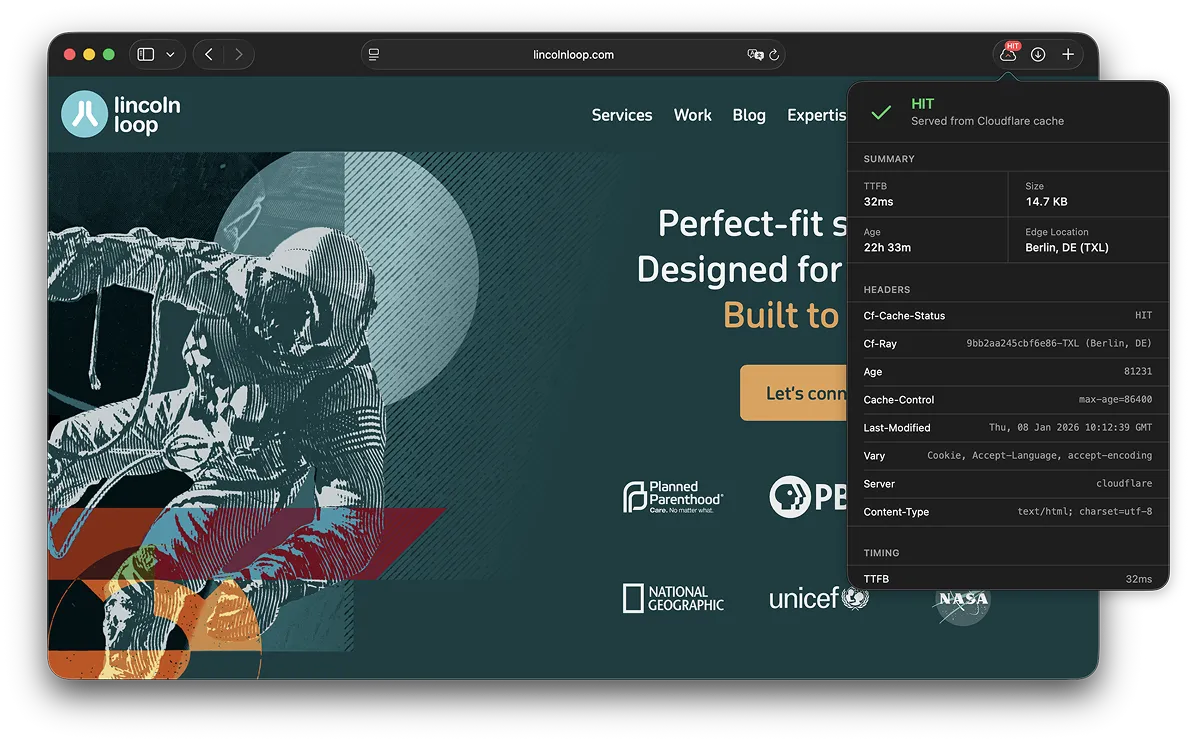
A Safari extension that shows whether your page was served from cache or origin — without opening DevTools. Instantly see HIT/MISS status in the toolbar, with detailed headers and performance metrics one click away.


Example

Features
Toolbar Badge
HIT, MISS, or EXPIRED status immediately visible in your toolbar without opening DevTools.
Multi-CDN Support
Works out of the box with Cloudflare, CloudFront, Fastly, Akamai, Bunny CDN, Varnish, and more.
Performance Metrics
Detailed breakdown of TTFB, DNS lookup, TLS handshake, and download time via the Navigation Timing API.
Edge Location Mapping
Automatically translates obscure POP codes (e.g., FRA56, IAD89) into human-readable city locations.
Privacy First
All data processing happens locally in your browser. No analytics, no tracking, and no external servers.
Native Design
Feels right at home on macOS with full support for both light and dark system themes.
Perfect for...
- Debugging cache rules on your CDN
- Verifying deployment propagation
- Auditing client site performance
- Checking static asset delivery
- Spotting cache regressions in QA
- Quick sanity checks without DevTools